


 »
»Futurama news
»Articles
»Episode Guide
»Character Bios
»Encyclopedia
»Episode Capsules
»Freeze Frame
»Comic Capsules
»Futurama FAQ
»Futurama Staff
»Lists & References
»Merchandise
»TV Listings
»Web News
»Futurama Links
»What's Futurama
»Behind the Scenes

 »
»Futurama Chat
»Episode Reviews
»Comic Reviews
»Episode Trivia
»Random Trivia
»Alien Codecs
»Romance Graph
»Fan Art
»Fan Fiction
 »
»Ascii Art
»Sounds & Quotes
»Fan 3D Art
»Animation & Video
»Frame Grabs
»Guitar Tabs
»Nokia Stuff
»Original Scans
»Other Sounds
»Promo Pics
 »
»Futurama Fonts
»Icons & Cursors
»ICQ+ Scheme
»PocketPC Themes
»Screen Savers
»Software
»Wallpapers
»Winamp Skins
 »
»Game Addons
»CGEF Games
»Submitted Games
»Flash Games
»Who Shot Fry?
»Conceptual Art
 »
»Andie
»mARC 7-G
How to preorder Futurama Season 2 DVDs from amazon.de
The Futurama Season 2 DVDs will be released in Germany first (November 7th 2002). These discs include English and Spanish sound which makes them desirable for importing in case you have a Region 2 (Europe) or region-free ('fixed') DVD player (look at vcdhelp on how to 'hack' lots of players for region 2) and a PAL capable TV (some DVD players can convert the PAL to NTSC).
We expect the menus to be available in English like they were in the first DVD set.
Problem is: amazon.de is German. So here is a step by step guide on how to (pre-)order them:
- Click here to open the Futurama Season 2 DVDs at amazon.de in a new window. (or here if you rather want season 1)
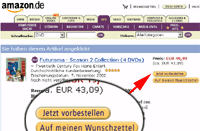 You'll see a little picture of the Season 2 Box to the left and lots of german all around. The price is what's written in red at the top right corner. Depending on whether the set is already available or has to be preordered, there will be either "Jetzt Vorbestellen" or "Einkaufswagen" on a button to the top right. Click that. (*Not* the "Auf meinen Wunschzettel"!)
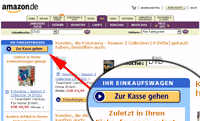 Next you see what's in your shopping cart at the left side border. This should include the Season 2 DVDs only with "Menge" next to the price being 1 (that's the amount, we can change it later on). Ignore everything to the right for now. At the top left, you see "Zur Kasse Gehen" (go to check out). Clicky clicky.
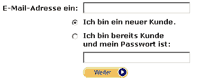 Now a series of pages will come up where amazon wants to get to know you better.
Enter your email address in the top box. If you don't yet have an amazon account check "Ich bin ein neuer Kunde" below that and then click "weiter", otherwise enter your amazon password in the lower box and check "Ich bin bereits Kunde" before clicking "Weiter". It will skip to either point 6 or point 8 then.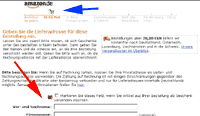 More stuff to enter:
- Leave the first check-box empty.
- Vor- und Nachname: Your First and Surname
- Firmenname: Company (leave empty)
- Stra�e und Hausnummer: Street address and number
- Postleitzahl: Your Zip-code (city code)
- Stadt: City Name
- Bundesland/Kanton: Your state if needed by your postal service (eg, Indiana)
- Land: Pick your country (USA = Vereinigte Staaten von Amerika)
- Telefonnummer f�r R�ckfragen: telephone number with country code (needed, but they'll hardly use it)
- Select "Ja" for "Ist das auch Ihre Rechnungsadresse?"
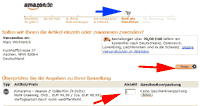 Now you see the address where the DVDs are heading to at the top left and a short summary below that. The text box under "Anzahl" tells you how many DVD sets you are ordering. Change it if you want more than one. At the top right below the truck is a link to a list of shipping prices. Rule of thumb: Germany/Austria: Free; EU: EUR5; Rest of Europe: EUR12; Rest of World: EUR15.50, but further 16% off your order.
The exact amount will be listed in step 9. Click one of the "weiter".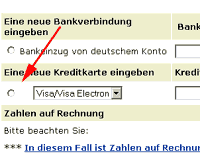 Now for payment and account setup. In case you already had an amazon account with a password, skip the next two points (7.1 / 7.2):
- Geben Sie ein Passwort ein: a password
- Geben Sie das Passwort noch einmal ein: Repeat the password
- Click the check-box next to where it says "Visa/Visa Electron"
- Pick your credit card type from the list.
- Under "Kreditkartennr." enter your credit card number
- Under "G�ltig bis" pick the month and year til when your card is valid
- Under "Name des Karteninhabers" enter the name of the credit card owner
- Geben Sie ein Passwort ein: a password
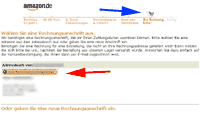 Depending on how things worked for your nation/order, you might now see a window asking where to send the affirmation letter. If that is the case, click the "Diese Rechnungsadresse verwenden" Button *at the top* if you want it to go to the address you entered before, or enter a new one just like in step 5 and use the "Diese Rechnungsadresse verwenden" button *at the bottom*.
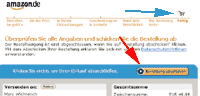 If you mastered all the previous steps, you'll now see the final affirmation screen, telling you the total cost to the in red right under "Gesamtsumme". Depending on where you live, you might be able to select a shipping mode under "Versandoptionen". Click the "Bestellung abschicken" button to finish todays lesson.
Have fun with your DVDs!